

Imagine a situation where you are sitting in a coffee shop, listening to the tune of a great song and you want to know which song it is, by whom. If you've got an iPhone in hand, it'll be just a tap away!
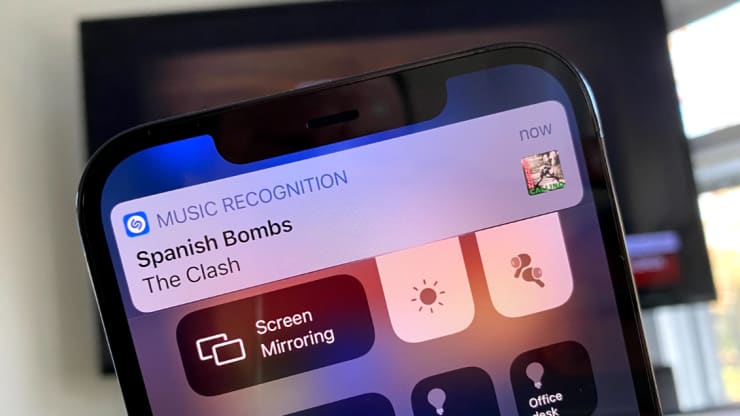
With an iPhone running iOS 14.2, you can recognize the song title like this – Photo: CNBC
According to Radio CNBC, the iPhone has a useful feature for music enthusiasts that has been around for the past few years, but not everyone knows it. With this feature, you can tune in to a song playing on the radio, in the bar, in the car, or at a friend's house.
You can do this without having to install any additional applications. All you need to do is swipe down on the screen with your finger and tap a button.
This is part of a feature that is integrated between the system software of the iPhone and iPad with the music recognition service Shazam - acquired by Apple in 2018.
With that said, to use that feature, you do not need to install the Shazam application, just set up a few steps as follows:
1, Open Settings on iPhone phones.
2, Select Control Center.
3, Drag down from the “More" and select the "+"blue edge section Music Recognition.
Thus, the track recognition feature has been added to the Control Center, whereby when you use your hand to slide down from the upper right corner of the iPhone screen, or from the bottom of the screen up if you are using an iPhone. With the Home button, you will open the Control Center window for further manipulation.
After clicking the Shazam button (as shown below), your phone will “listen” for a few seconds, then display the artist name and song title on the phone screen.
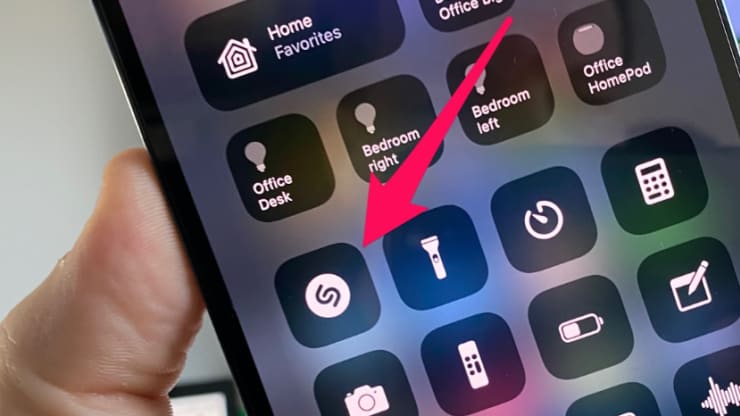
On the Control Center window, click the arrow button to point at, iPhone will help you find out the name of the song you are listening to – Photo: CNBC
It will also save the songs you've searched with this feature so you can come back to listen later. To view them again, just press and hold the Shazam button on the Control Center.
 English
  Vietnamese