

The following article will guide users to check and update the personal information of the mobile subscriber number they are using, avoiding the case of SIM lock on March 31.
Instructions to check if the personal information of mobile subscribers is correct or not
According to the provisions of Decree 49/2017/ND-CP, by the end of January 31, if mobile subscribers have information that does not match with information in the national population database, then account will be locked. This move is to thoroughly solve the situation of using junk SIM or SIM with incorrect information declared as prescribed.
Mobile subscribers who currently have mismatched information will receive notification messages from carriers to update personal information for subscriber accounts. Since receiving the notification, the subscriber has 15 days to update the information before being locked out of one-way communication.
After the next 15 days, if the information is still not updated correctly, the subscriber will be blocked from two-way communication. 60 days after receiving the first notice without updating the information, the mobile subscription will be terminated.
In case you have not received a notification message from your network operator, but want to check if your mobile subscription information is correct, you can do so by following the steps below.
Note: This method can be applied to all mobile subscribers, regardless of the carrier in use.
– The way to check mobile subscription information is quite simple, you just need to send a message with the content tttb and send to switchboard 1414 (free of charge for texting).
– Wait a moment, switchboard 1414 will respond to your message with personal information of the mobile phone number you are using, including full name, date of birth, citizen identification number, place of issue, date grant…
If the information provided by the operator 1414 is correct with your current personal information, it means that the mobile subscriber already has the correct information and the user does not need to do anything further.
In case the returned information is incorrect or incorrect, you can directly contact the carrier's agents for support, or follow the instructions below.
Instructions to change subscriber information when it is wrong
The article will guide users on how to standardize subscriber information of the three largest carriers, Viettel, VinaPhone and Mobifone. For smaller mobile networks, you can contact your dealer or customer service center for instructions.
For Viettel network users
If you are using Viettel's mobile network and discover that your subscriber information is incorrect or incorrect, you can follow these steps to update your subscriber information again.
– First, you download and install the My Viettel application on your smartphone. You can download the app for Android here and version for iOS here.
– After installing the MyViettel application, you log in to your account. In case you do not have an account, you use your phone number (the phone number to edit information) to register a new account.
– From the main interface of the application, click on the search button in the upper right corner, search with the keyword "Normalization of information".
– At the search results, select “Normalize information” in the “Features” section.
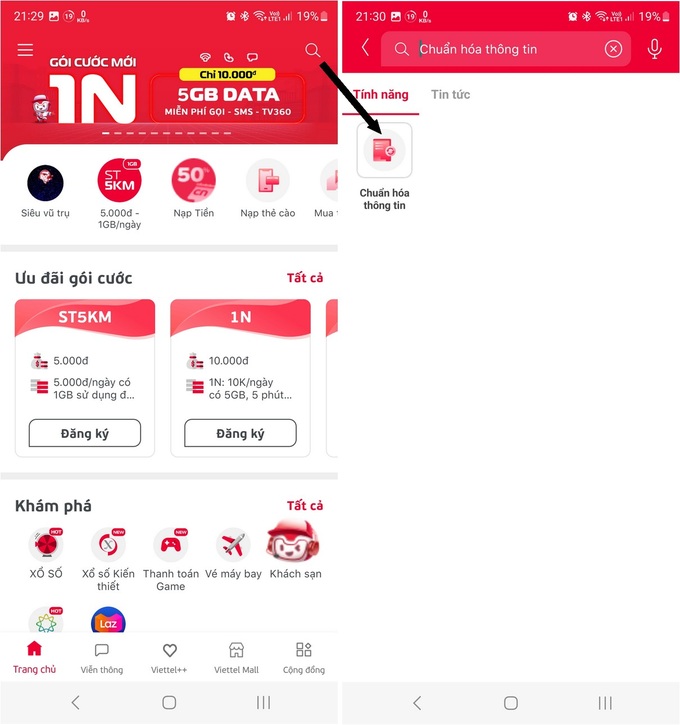
The next step, you fill in your personal information and follow the requirements provided by the application. The system makes a video call to the user's phone number. You receive this call and complete the information normalization process.
For VinaPhone network users
Similar to Viettel network operator, users of Vinaphone network can also edit information if it is incorrect through the application of this network operator.
– First, you download the application My VNPT for Android here or for iOS here.
– After starting the application, log in to your account (or choose to register if this is the first time using the application) with the VinaPhone phone number that needs to be edited.
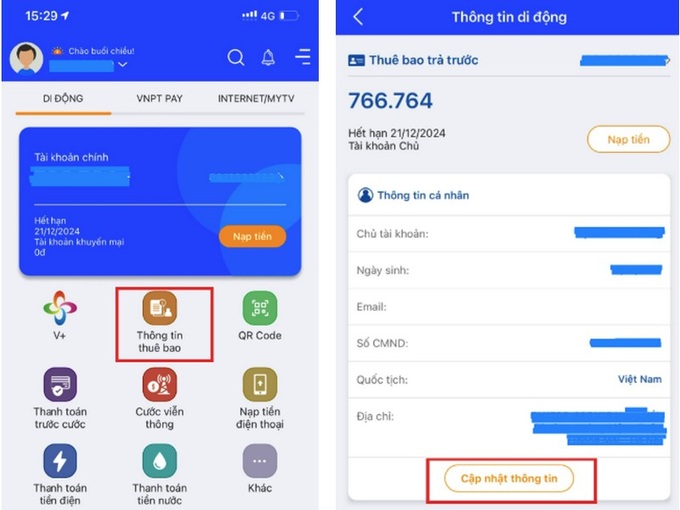
– At the main interface of the application, select “Subscriber information”. If the user is subject to standardization of subscriber information, the "Update information" option will appear here. You click this option and follow the instructions of the application.
For MobiFone mobile network users
Like the two carriers above, MobiFone users can edit and standardize personal information through the My MobiFone application.
– First, you install the application My MobiFone version for Android smartphones here and version for iOS here.
– Log in (or register an account) with the subscription number you are using. At the main interface of the application, click the "More" button in the upper corner below, then select "Customer information" from the menu that appears.
– If you are a subscriber and need to re-standardize personal information, select “Register information” from the interface that appears, then follow the instructions to update your information with the network operator.
In case of problems with the process of registering personal information, users can go directly to stores, agents or customer care centers of carriers for guidance.
From the Internet
 English
  Vietnamese