

As reflected by many smartphone users running Android platform in Vietnam, in recent times many people have been "sticked" by a type of malicious code capable of taking over the entire screen. When infected with this type of malicious code, even if the user restarts the phone, he cannot return to the main screen and use the smartphone normally.
At this time, on the smartphone screen, a message will appear: “Phone is locked. Any way of rebooting doesn't work, even restarting the device can't." At the same time, the hacker also gave a phone number so that the victim could contact and buy a decryption key, for a price of 50,000 VND.
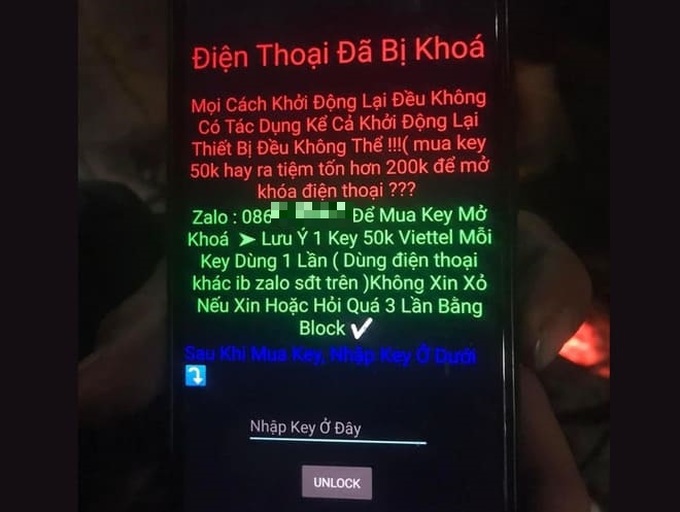
According to research, this type of ransomware is distributed by hackers through the .apk file format (application installation file for smartphones). Users searching for installation files of applications mistakenly downloaded .apk files from websites controlled by hackers. When installing applications from these files, the ransomware will immediately take control of the screen as mentioned above.
What to do when ransomware takes control of the screen?
In fact, this type of ransomware does not penetrate too deeply into the system and users can completely handle it themselves in case of accidentally installing it on a smartphone, instead of spending money for hackers to buy a decryption key.
In case you accidentally install ransomware on your smartphone, you need to restart your smartphone and put it into “Safe mode”.
When booting into Safe Mode, the smartphone will only launch system apps without allowing 3rd party apps to start, which will prevent the ransomware from launching and taking control of the screen. image.
To enable Safe Mode on your smartphone, follow these steps:
– Press and hold the power button on the smartphone, then select “Power off” from the menu that appears to turn off the device.
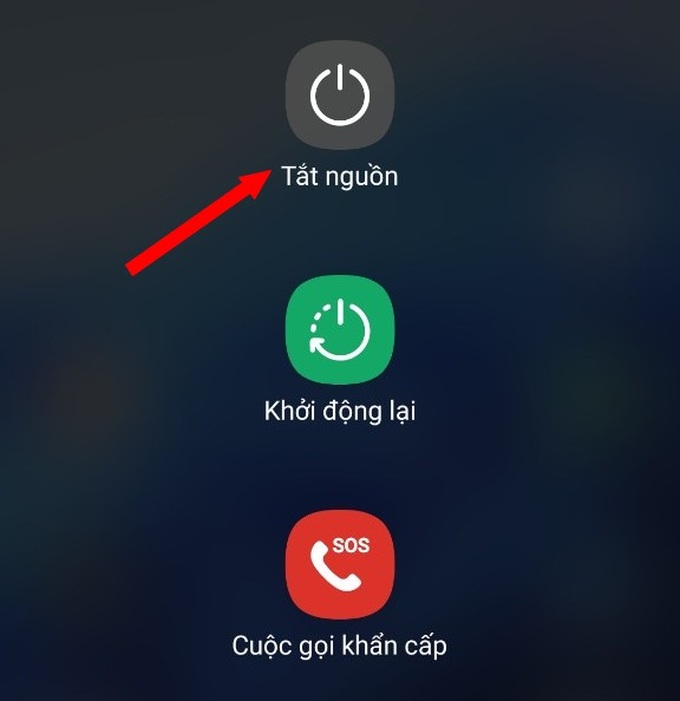
– After the phone is powered off, press and hold the power button and the volume down button on the smartphone at the same time. When the phone lights up, release your hand from the power button and keep holding the volume down button, until the smartphone's lock screen appears.
Now, the corner of the smartphone screen will display the message "Safe mode", which means you can access Safe Mode on your smartphone.
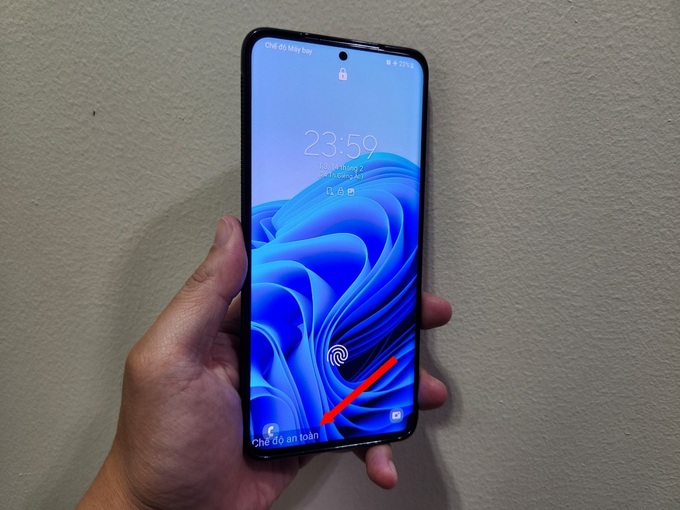
Unlock smartphone screen. At this point, the ransomware will no longer start with the system, so you are no longer taking control of the home screen.
Now, you can access the application management section on your smartphone, find and remove suspicious applications that are malicious, applications that you have just installed on your smartphone. After you finish removing the apps, restart the smartphone to return to normal usage mode.
If the ransomware continues to appear, return to Safe Mode to find and remove other suspicious applications on the smartphone, until the device returns to normal.
Note: when restarting your smartphone after entering Safe Mode, your smartphone may automatically go into airplane mode (disconnect all connections). Therefore, you need to turn off airplane mode after restarting your smartphone to ensure a full connection.
Notes when installing applications on smartphones running Android
Compared to the iOS platform, the Android platform is more targeted by hackers due to the large number of users and diverse number of manufacturers, so there are many potential risks. security vulnerable to exploitation…
If you are using an Android smartphone, you should follow the following to avoid the risk of becoming a victim of hackers and malicious code:
– Only install apps from trusted sources. It is best to install through the Google Play app store.
In case you need to find and install applications via .apk files, you should download from large and reputable websites, avoid downloading from obscure sites or download files through search sites from Google , because it is possible to download the wrong .apk file containing malicious code.
– One thing to keep in mind, not every app downloaded through Google Play is “clean” and safe. In fact, hackers can sometimes bypass Google's censorship team to spread malicious code on Google Play.
Therefore, before installing an application, you should read user reviews and ratings about that application. If the comments are general, do not focus on the application's features or comments from unknown users... they may be fake comments, generated by automated tools to bypass the user. In this case you should ignore that application and find another application to install.
– In addition, users need to immediately update the newly released Android versions on smartphones to patch security holes on the device, helping to avoid being exploited and attacked by hackers.
 English
  Vietnamese