

Not wanting to stay out of the race to develop artificial intelligence, Meta (Facebook's parent company) has officially launched MusicGen, an AI software that allows anyone to compose music as they please.
The technology world is having a fierce race in the development of artificial intelligence (AI). Microsoft, Google… all have AI software in different fields.
As one of the "big guys" of the technology world, surely Meta will not want to be out of this race. Recently, Meta has officially launched MusicGen, an AI tool that allows users to compose their own music.
Composing music is not a simple task, requiring the composer to have knowledge of music theory, the ability to assess sound ... however, with MusicGen, what users need to do is enter text content to describe the music they want to create, this software will rely on that content to compose appropriate music.
For example, users can ask Music to create "a 90s-style pop track, with pounding drums and electronic accompaniments."
Based on the information provided by the user, MusicGen can create different tracks for them to choose from.
Users can also ask MusicGen to rely on the melody of an existing favorite track, so that the software can rely on the style of that track to mix or create a new track.
However, the downside of MusicGen is that it can only create tracks with a maximum length of 12 seconds.
Meta says MusicGen is trained on 20,000 hours of music listening from 10,000 high-quality copyrighted tracks that Meta can use and train its artificial intelligence.
In addition, MusicGen is also trained on 390,000 tracks shared for free via online platforms.
Music generated by MusicGen will be licensed by Meta for use in commercial products without restrictions.
However, according to the initial assessment of "people in the profession", the music created by MusicGen is still limited and quite naive. However, the advantage of artificial intelligence is the ability to learn, so MusicGen's ability to compose music will improve over time.
MusicGen . User Manual
Different from other AI platforms, Meta is providing MusicGen as open source, allowing developers to build features for MusicGen or integrate this AI into composer tools.
Users can experience the reality of MusicGen through online tools built by developers based on the source code of this AI. One of the tools using the MusicGen source code is being available for free here.
After accessing the website, you can enter a description of the music you want to create in the "Describe your music" box (in English). In the "Condition on a melody" section, you can upload a sample song so that MusicGen can use it to create a new song.
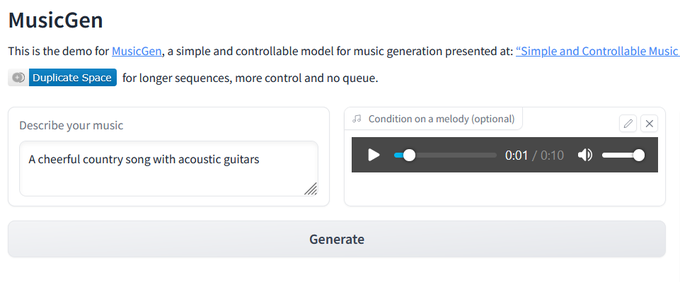
Finally, click the “Generate” button below. Wait for a moment until MusicGen generates the music as per your description.
Users can ask MusicGen to recreate tracks based on their description to get the most favorite music. In the description of the track, you should fill in the style and style details you want to help MusicGen create a more satisfactory music.
 English
  Vietnamese